 FocusDrop


Swipe the day into shape.
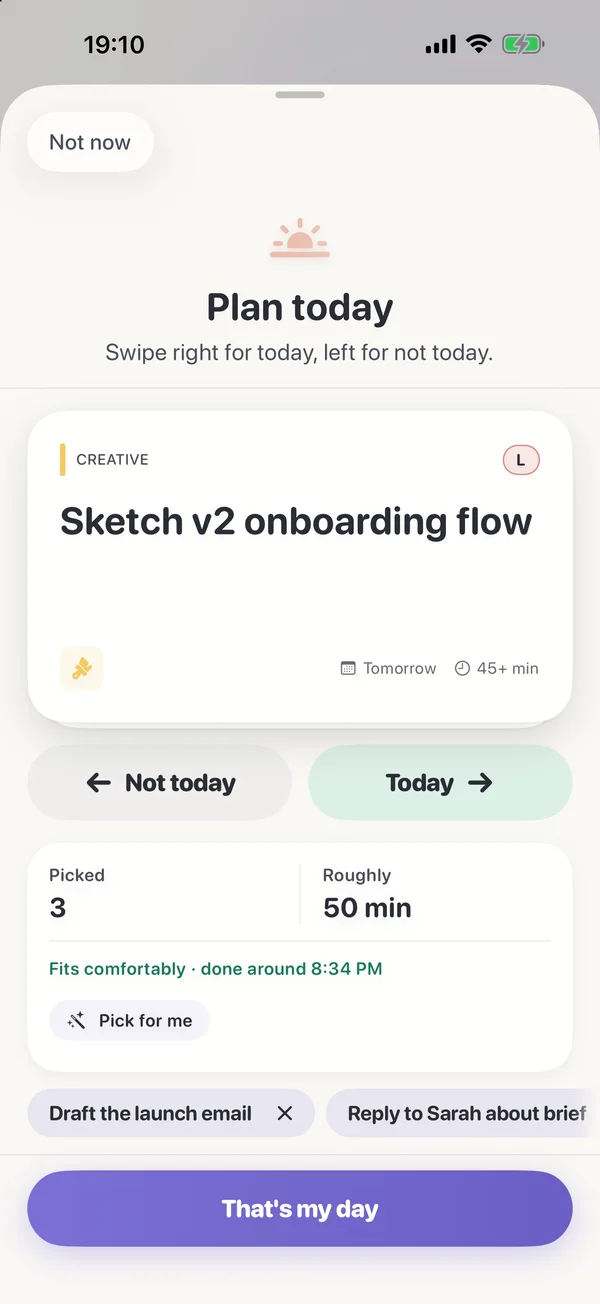
One card at a time: right for today, left for not today. Planned tasks then lead the deck, so the thing you decided on this morning is the thing in your hand this afternoon.
Start a focus in your Mac's notch, on your iPhone or on your wrist, and the others show it. One task at a time — no account, nothing to feel guilty about.
Free on iPhone and Apple Watch · the Mac app is coming soonFree on iPhone, Apple Watch and Mac · one Pro covers all three
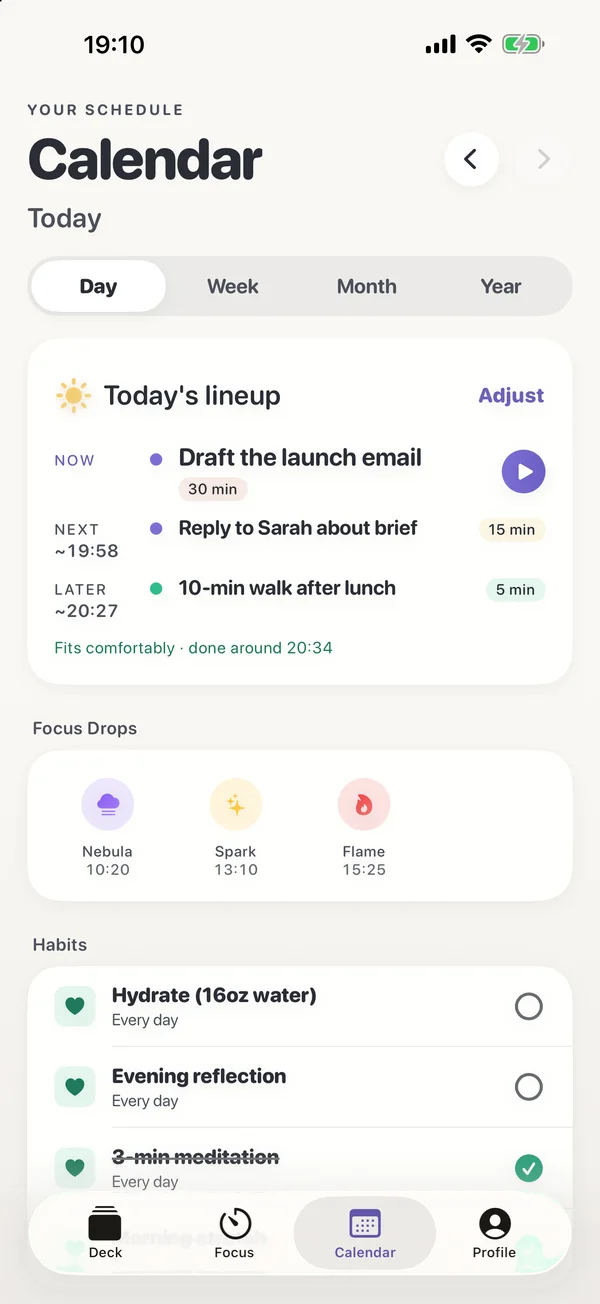
Fits comfortably · done around 21:40
2/4 rituals
First one today. The hardest one's behind you.


FocusDrop is an ADHD focus timer app with a to-do deck that shows you one task at a time and starts a focus session with one swipe. It's on the App Store as FocusDrop: ADHD Focus Timer, by the solo developer Kiryl Zhukouski, for iPhone and Apple Watch, with a Mac app coming soon, Apple Watch and Mac. It's free for up to 7 tasks and 5 focus sessions a day; Pro is $3.99 a month, $23.99 a year or $49.99 once.
As of 23 October 2026, the App Store has FocusDrop 1.6.1 for iPhone and Apple Watch. FocusDrop 1.8 and FocusDrop for Mac 1.0 are built and coming soon; neither is on the App Store yet.
Since {{RELEASE_DATE}}, the App Store has FocusDrop 1.8 for iPhone and Apple Watch, and FocusDrop for Mac 1.0.
The same deck, the same session and the same streak, on whatever's in front of you. Nothing to start again, nothing to sign in to. This is a day with FocusDrop 1.8 and the Mac app, both coming soon.

A planning ritual that takes twenty seconds, a focus screen with one control instead of six, a clock face for a phone propped on your desk, and a streak you're finally allowed to pause.
One card at a time: right for today, left for not today. Planned tasks then lead the deck, so the thing you decided on this morning is the thing in your hand this afternoon.
Only the Focus screen rotates — your deck never greets you lying on its side. Classic and Disc are free; Numerals, Flip, Big and Drop come with Pro.
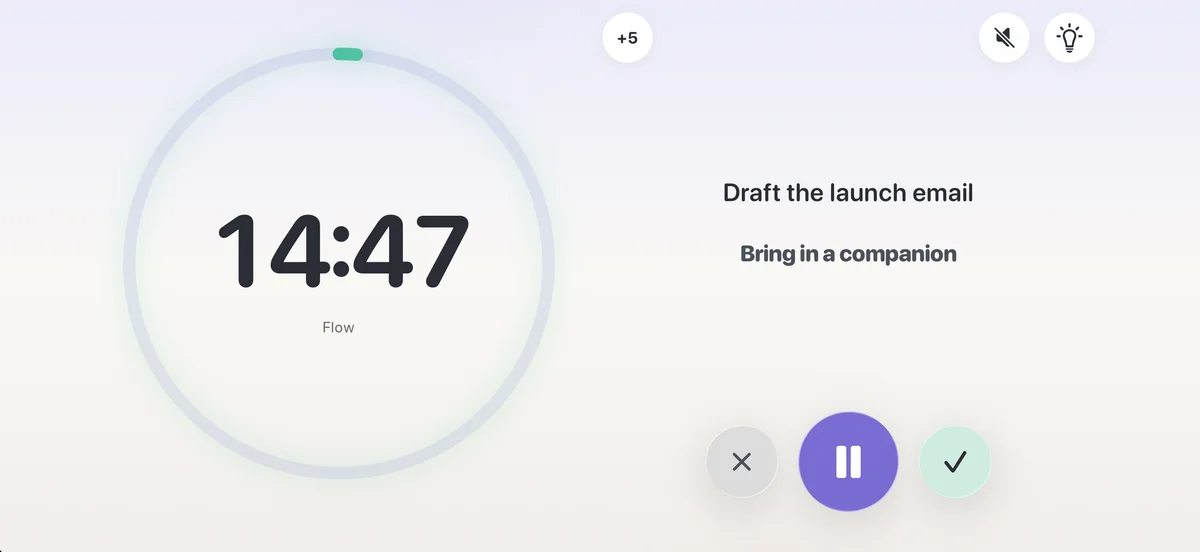
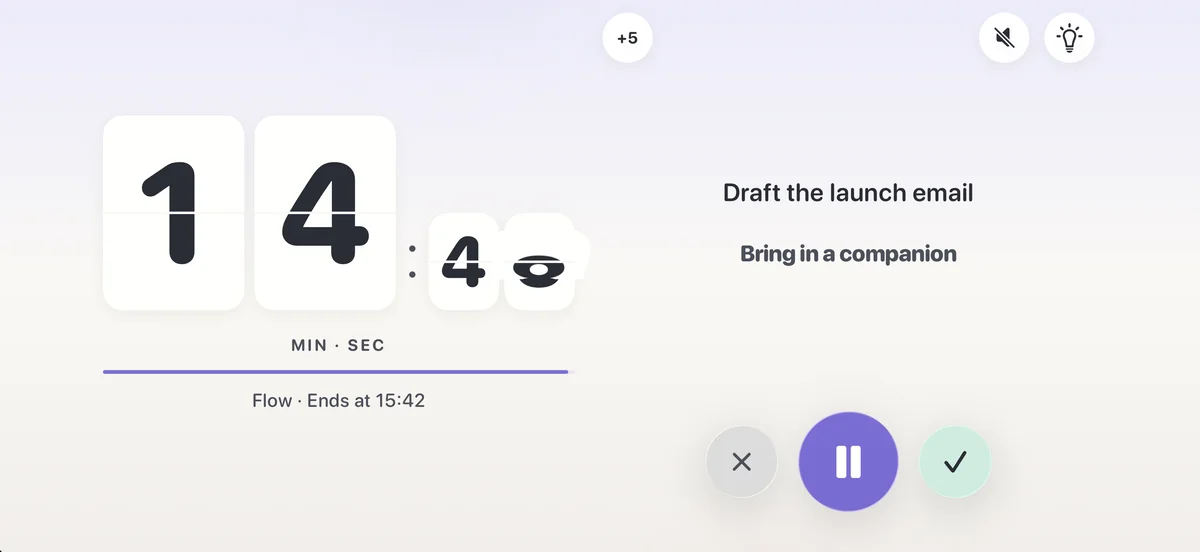
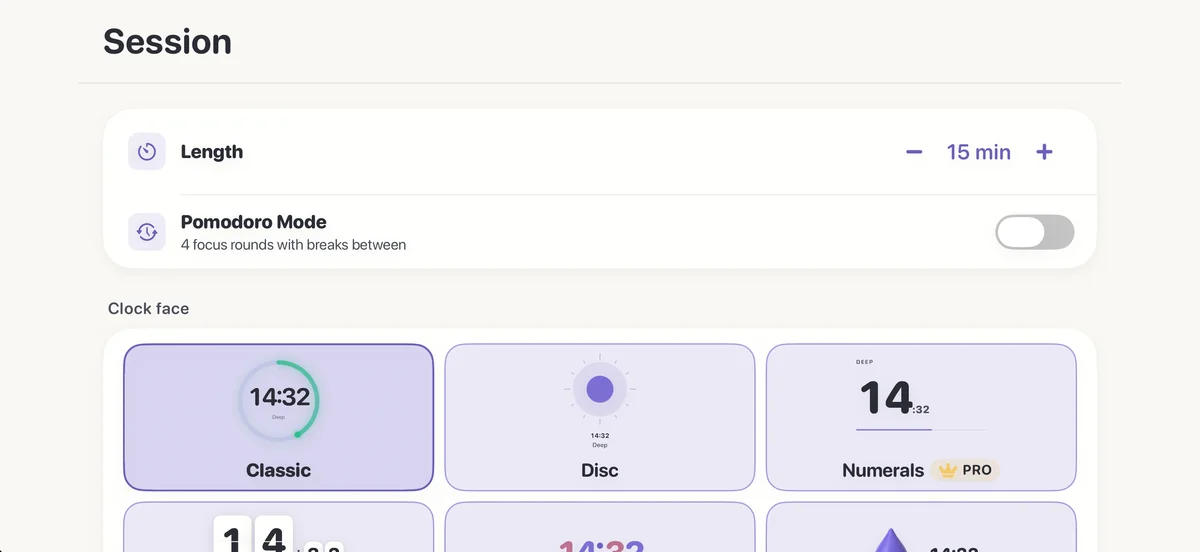
Pomodoro and an exact length moved behind the sliders button, out of the way.
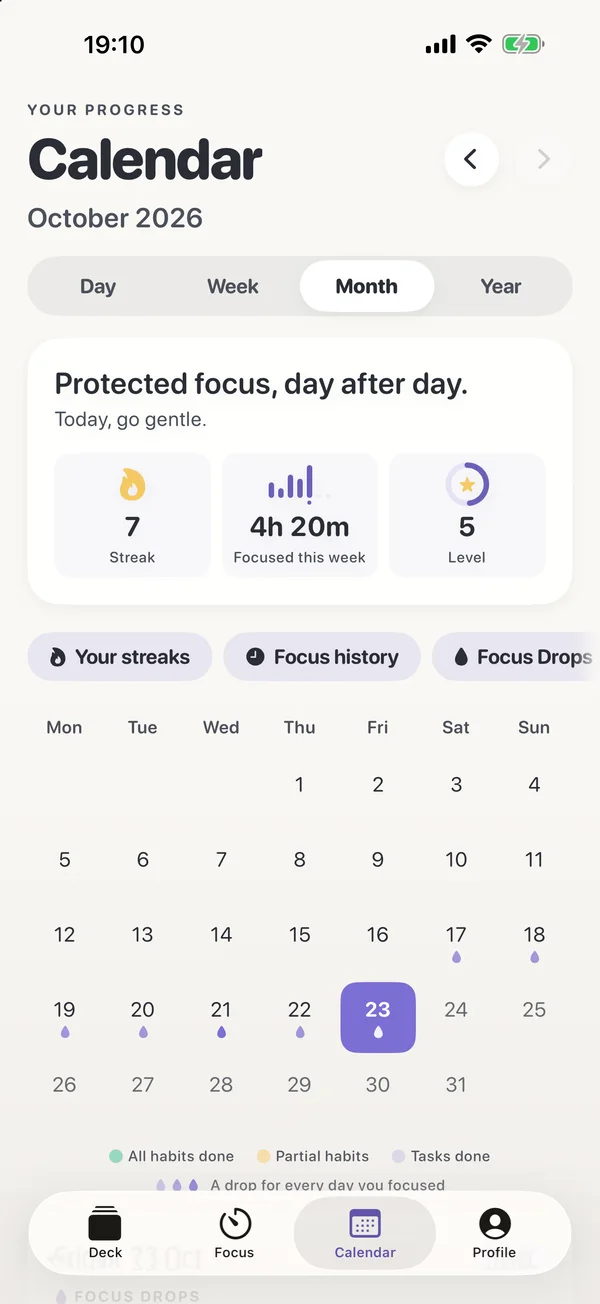
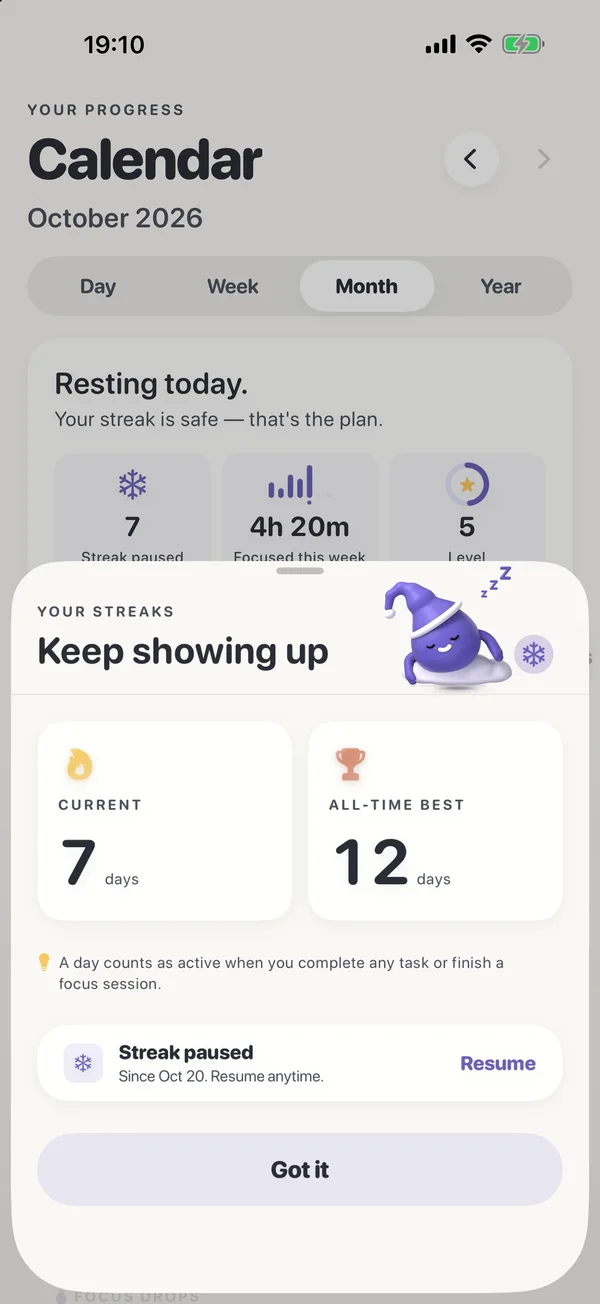
Your streak, this week and your level sit above the Month view. Four tabs, not five.
Pause it and it waits for you. Drop goes to bed until you're back.
Rendered in 3D, Drop shows you around on day one, keeps you company on an empty deck, breathes with you after a session, and sits beside you in Co-Focus Pro with his own checklist.
Meet him properlySix sounds generated on the fly rather than looped, with gentle fades and their own level. They step aside when your own music is playing.
Focus from today's plan. A play button beside Now in the Calendar's Day view, or touch and hold any of today's tasks.
Focus Drops on your calendar. A small drop marks every day you focused, and the day lists what you earned.
Gentler reminders, a new welcome, sheets that fit — and a short note after each update, kept in Profile.
No Dock icon, no window to manage. A drop sits in your menu bar; hover the notch and the island opens with what's next, a focus dial and today's habits. On a Mac without a notch it's a small pill at the top of the screen.
Start and the island folds into two small wings: a drop on one side, the countdown on the other — and in the menu bar, in every app.
⌃⌥F opens ready to add a task, or to park a stray thought mid-session so the thread holds. It's one registered key combination — no Accessibility permission.
Now, Next and Later with soft times, and today's calendar events as fixed points if you allow it — read-only, today only, never stored or sent.
Honest about what isn't there. Co-Focus, AI Task Breakdown, Pomodoro Mode, widgets, Live Activities, the heatmap, weekly challenges, the Reward Shop, themes, landscape faces and creating habits are iPhone features and are not in Mac 1.0. Mac 1.0 needs macOS 14 Sonoma or later, on an Intel or Apple silicon Mac.
An Apple Watch focus timer for the moments you're away from a screen: start a Sprint, Flow or Deep focus from your wrist, pause it or end it, and it's the same session as on your iPhone. Coming with 1.8 and the Mac app: Drop celebrates on your wrist when a session ends and breathes with you after a task, and a session running on your Mac shows on the Watch too.When a session ends, Drop celebrates on your wrist, and after a task he breathes with you. Running one on your Mac? The Watch shows that too.
Drop is FocusDrop's mascot — a small purple droplet. He celebrates what you did and never mentions what you didn't. Say hello:
Tap a button — or Drop himself.

A to-do list doesn't help if opening it feels like work. The deck shows one task at a time and turns the decision into a swipe. Drag the card, or use the arrow keys — the real deck works exactly like this.
Most focus timer apps time work you've already started. An ADHD focus timer has to solve the starting problem first — so FocusDrop puts one card in front of you, makes the decision small, and starts the clock the moment you say yes.
One task at a time, never a wall of them. Right to focus, left for later, up for done, down for details. "Decide for me" picks when you can't.
Pick 10, 15 or 25 minutes free, or any length with Pro. Run Pomodoro rounds, or start an open focus with no countdown at all, and with Pro add five more minutes mid-session. Or try the free ADHD focus timer in your browser.
Co-Focus is body doubling without a video call: calm company through a session that remembers your last ones on a task. Coming in 1.8: In 1.8, Drop sits beside you with his own checklist. Software on your iPhone, not a person.
"Sort out the garage" becomes three to six steps, each small enough to do in under five minutes, drafted by Apple Intelligence on a compatible iPhone (iPhone 15 Pro or later, iOS 26 or later). No API key, no AI server, no network call.
A Live Activity carries the task and the time left, and widgets put your next task one tap from Focus. A timer you can't lose in another tab.
Daily or every-few-days habits, a drop for every focus session, and, coming in 1.8,, in 1.8, a calendar where each day you focused carries a mark. Park a habit; revive it later.
Mark a gentle day, mend yesterday, use a weekly streak freeze with Pro, or, coming in 1.8in 1.8, pause the whole thing. A streak should be evidence you showed up, not a debt.
Mark the task done after a session and you get what you did, three guided breaths, then what's next. The hardest part of the next task is the gap before it.
English, Japanese, Korean, Traditional Chinese, German, French, Spanish and Brazilian Portuguese, on every device FocusDrop runs on.
| FocusDrop | A Pomodoro timer | A to-do list app | |
|---|---|---|---|
| Shows you one task at a time | Yes — a swipe deck | No tasks at all | The whole list, every time |
| Times the work | Yes — set lengths, Pomodoro or open focus | Yes — fixed rounds | Rarely |
| One session across your devices | Yes — iPhone and Apple Watch; the Mac app is coming sooniPhone and Mac through your own iCloud, Apple Watch through your iPhone | Usually one device | Lists sync; timers don't |
| Helps you plan the day | Coming in 1.8: Now, Next and Later that re-flowYes — Now, Next and Later that re-flow | No | Due dates and overdue piles |
| Body doubling | Yes — an AI body double (Pro, iPhone) | No | No |
| Forgives a missed day | Yes — gentle days, mend yesterday, and a streak pause coming in 1.8 and a streak pause | Nothing to forgive | Overdue counters |
| Account required | None | Sometimes | Usually |
FocusDrop has no account system, no servers of its own, no analytics SDK and no third-party code at all. That's why the App Store listing says "Data Not Collected". It works offline, too: your data is stored on your device, and iCloud sync catches up when you're back online.
With iCloud sync on, your tasks and session history sync through your own private iCloud, which the developer can't read. There's no FocusDrop account to create, lose or delete.
AI Task Breakdown and Co-Focus's coaching run on your device through Apple Intelligence; nothing you type is sent to an AI service or to the developer. No API key, no AI server.
Zero dependencies — no SDKs, trackers, ad networks or crash reporters. The calendar, if you allow it, is read for today only and never stored.
No trial countdown on the basics. Pro is one purchase, and when the Mac app is released, the same purchase unlocks it there too.Pro is one purchase for iPhone and Mac: buy it on either and the other unlocks by itself. The Apple Watch app is free and works through your iPhone.
Prices are US App Store prices, checked 23 October 2026, and vary by region. Subscriptions are billed through your Apple Account and managed there. With sync on, the free limits are shared across your devices.
I'm Kiryl Zhukouski. I have ADHD, and I make FocusDrop, for ADHD adults, largely because I needed it. I can lose an entire afternoon to a task that takes eleven minutes, and starting is the problem I built the app to solve.
I'm a developer with ADHD, not a clinician. On the blog I write up the things that actually worked on me, and the ones that didn't: lived experience, not medical advice.
FocusDrop is a focus timer and to-do deck for adults with ADHD that shows you one task at a time and starts a focus session with one swipe. It's on the App Store as FocusDrop: ADHD Focus Timer (ID 6766502424), made by the solo developer Kiryl Zhukouski, and it runs on iPhone and Apple Watch, with a Mac app coming soon.
It's free for up to 7 tasks and 5 focus sessions a day, and FocusDrop Pro is $3.99 a month, $23.99 a year or $49.99 once. It's software, not a supplement, and it isn't one of the other App Store apps with a similar name.
FocusDrop is a focus timer and to-do deck for adults with ADHD that shows you one task at a time and starts a focus session with one swipe. It's on the App Store as FocusDrop: ADHD Focus Timer (ID 6766502424), made by the solo developer Kiryl Zhukouski, and it runs on iPhone, Apple Watch and Mac.
It's free for up to 7 tasks and 5 focus sessions a day, and FocusDrop Pro is $3.99 a month, $23.99 a year or $49.99 once. It's software, not a supplement, and it isn't one of the other App Store apps with a similar name.
Yes, FocusDrop is free to download, and the free tier doesn't run out: up to 7 tasks in your deck and 5 focus sessions a day, with habits, streaks, the Apple Watch app and iCloud sync included. Sessions you start from the Apple Watch count toward the 5.
FocusDrop Pro is $3.99 a month, $23.99 a year with a 7-day free trial, or $49.99 once. Those are US App Store prices; other regions have their own, and the app shows yours before you pay.
FocusDrop works on iPhone and Apple Watch together today: the Watch app starts, pauses and ends focus sessions that run on your iPhone, and keeps your tasks and today's habits a tap away.
FocusDrop for Mac is built and coming soon. Once it's released, tasks, habits, focus sessions, XP, streaks and drops sync between iPhone and Mac through your own private iCloud, and a timed session started on one device shows on the others. There's no FocusDrop account to sign in to.
Yes: FocusDrop syncs tasks, habits, focus sessions, XP, streaks and drops between iPhone and Mac through your own private iCloud, and reaches the Apple Watch through your iPhone. A timed session started on one device shows on the others.
Some things stay put on purpose: today's plan, parked thoughts, your focus sound and your Mac settings belong to the device you made them on. There's no FocusDrop account to sign in to.
Yes, FocusDrop works offline and has no account to make or sign in to. Your tasks, sessions and habits are stored on your device, the timer needs no connection, and the AI features run on the device through Apple Intelligence.
The internet is used only for iCloud sync, if you have it on, which catches up when you're back online, and for App Store purchases.
FocusDrop's Co-Focus is an AI body double, not a real person: body doubling without a video call or a stranger. It stays with you through a session with calm prompts and remembers your recent sessions on a task.
Co-Focus is a Pro feature, on iPhone only. Its personalised coaching lines run on your device through Apple Intelligence, so nothing you type is sent to an AI service or to the developer. If what you need is a human holding you accountable, a service like Focusmate will serve you better. The blog has a comparison of body doubling apps without a video call, with Focusmate for contrast.
FocusDrop is built around the part before a Pomodoro timer starts: a Pomodoro timer times work you've already started, while FocusDrop shows you one task at a time and starts the clock the moment you say yes.
FocusDrop has Pomodoro rounds too: four rounds of the length you pick, with a short break after each and a 15-minute break after the fourth, alongside set lengths and an open focus with no countdown at all. If you only want the timer, the free online Pomodoro timer on this site runs in any browser.
One missed day doesn't have to reset a FocusDrop streak. Mark a gentle day and the streak holds; miss a single day and you can mend yesterday, free, once a week; and FocusDrop Pro adds a streak freeze, one a week, that covers a missed day by itself.
Two or more missed days in a row do reset it. FocusDrop 1.8, coming soon, adds a free streak pause for holidays and sick days.
One missed day doesn't have to reset a FocusDrop streak. Mark a gentle day and the streak holds; miss a single day and you can mend yesterday, free, once a week; and FocusDrop Pro adds a streak freeze, one a week, that covers a missed day by itself.
Two or more missed days in a row do reset it, unless you've paused the streak: the pause is free, for holidays and sick days, and the streak waits until you resume.
Yes, FocusDrop lets you park a habit instead of deleting it: it leaves today's list and keeps its history, and you can revive it whenever you're ready. Habits can repeat daily, on weekdays, weekly, on the days you choose or every few days, and they're free.
No, FocusDrop doesn't block apps or websites, and it doesn't use Screen Time. It helps you pick one task and start it; it doesn't lock anything. If blocking is what you need, Screen Time's app limits or a dedicated blocking app will do that job better, and you can use one alongside FocusDrop.
No, FocusDrop doesn't collect your data: there's no account, no FocusDrop server, no analytics SDK and no third-party code, and the App Store privacy label says "Data Not Collected".
The AI features run on your device through Apple Intelligence; nothing you type is sent to an AI service or to the developer. With iCloud sync on, your tasks and session history sync through your own private iCloud, which the developer can't read. If you allow calendar access, FocusDrop reads today only, keeps it in memory, and never writes to your calendar or sends it anywhere. The privacy policy has the details.
FocusDrop is made by Kiryl Zhukouski, a solo developer who has ADHD. On the App Store it's FocusDrop: ADHD Focus Timer (ID 6766502424).
It isn't affiliated with other apps that have similar names, such as Focusdrop: Daily Focus Streak or FocusDrop: 25 Min Timer, which are made by other developers.
FocusDrop needs iOS 18 or later on iPhone, and watchOS 10 or later on an Apple Watch paired with that iPhone. FocusDrop for Mac, coming soon, needs macOS 14 Sonoma or later, on an Intel or Apple silicon Mac.
AI Task Breakdown and Co-Focus's personalised coaching also need Apple Intelligence: an iPhone 15 Pro or later on iOS 26 or later, with Apple Intelligence turned on and available for your language and region. FocusDrop is available in English, Japanese, Korean, Traditional Chinese, German, French, Spanish and Brazilian Portuguese, and follows your device's language.
FocusDrop needs iOS 18 or later on iPhone, and watchOS 10 or later on an Apple Watch paired with that iPhone. FocusDrop for Mac needs macOS 14 Sonoma or later, on an Intel or Apple silicon Mac.
AI Task Breakdown and Co-Focus's personalised coaching also need Apple Intelligence: an iPhone 15 Pro or later on iOS 26 or later, with Apple Intelligence turned on and available for your language and region. FocusDrop is available in English, Japanese, Korean, Traditional Chinese, German, French, Spanish and Brazilian Portuguese, and follows your device's language.
FocusDrop for Mac, coming soon, lives in the menu bar, with no Dock icon. On a MacBook with a notch, hover over the notch for a moment or click it, and an island opens with your next task, a focus dial and today's habits. On a Mac without a notch it's a small pill at the top centre of the screen.
⌃⌥F opens it from any app, ready to add a task or to park a thought during a session. There's more on the FocusDrop for Mac page.
FocusDrop for Mac lives in the menu bar, with no Dock icon. On a MacBook with a notch, hover over the notch for a moment or click it, and an island opens with your next task, a focus dial and today's habits. On a Mac without a notch it's a small pill at the top centre of the screen.
⌃⌥F opens it from any app, ready to add a task or to park a thought during a session. There's more on the FocusDrop for Mac page.
No: FocusDrop is an iPhone and Apple Watch app, with a Mac app coming soon. There's no iPad version and no Android app planned. One person builds it, and the native Apple pieces, like Live Activities, Apple Intelligence and iCloud, are most of what makes it work.
There's no web version of the app. The free focus timer at focusdrop.app/focus-timer runs in any browser, without tasks, an account or sync.
No: FocusDrop is an app for iPhone, Apple Watch and Mac. There's no iPad version and no Android app planned. One person builds it, and the native Apple pieces, like Live Activities, Apple Intelligence, iCloud and the notch, are most of what makes it work.
There's no web version of the app. The free focus timer at focusdrop.app/focus-timer runs in any browser, without tasks, an account or sync.
Free on the App Store, with no account to make and nothing to cancel if it isn't for you.


